How To Stop A Dashboard Phone Holder From Falling: 10 Checks For Heat, Surface Texture And Mount Placement
A dashboard phone holder that keeps dropping may not need replacing. Heat, dust, textured surfaces and poor placement can weaken its grip. These 10 checks can help you find the real problem and keep the mount more secure.
10 Reasons Your Dashboard Phone Holder Will Not Stick And How To Fix It
A dashboard phone holder seems like one of those car accessories that should require almost no thought. Attach it, place the phone inside and get on with the drive. Yet plenty of holders have other plans. They stay perfectly secure during a morning commute and suddenly tumble towards the gear lever after the car has spent an afternoon parked in the sun. The problem isn't always a weak suction cup or cheap adhesive. Dashboards create surprisingly difficult mounting conditions. They heat up rapidly, collect fine dust, curve in awkward places and often have textured finishes that prevent suction cups from forming a proper seal. Add the weight of a large latest smartphone, vibrations from uneven roads and the occasional enthusiastic adjustment of the viewing angle, and even a decent holder can start losing its grip. Replacing the mount immediately might solve the problem, but it can also hide a simpler fix. Before buying another one, check what the holder is actually attaching to and what happens to that surface throughout the day. These ten checks cover the most common reasons dashboard phone holders fall and the practical adjustments that can help them stay where they belong.
10 Reasons Your Dashboard Phone Holder Will Not Stick And How To Fix It; Photo Credit: Pexels
What To Check Before Blaming The Phone Holder
1. Check Whether Dashboard Heat Is Softening The Mount
A phone holder that works well early in the morning but drops later in the day gives away an important clue: temperature may be causing the problem.
Car interiors can become intensely hot when parked outdoors. The dashboard receives plenty of direct sunlight through the windscreen, which makes it one of the hottest surfaces inside the cabin. That heat can soften the rubber around a suction cup or weaken the adhesive layer underneath a sticky mounting pad.
Some gel-style suction cups feel exceptionally tacky when new. Heat can gradually change that consistency. Instead of remaining firm enough to maintain suction, the material can become soft and slightly slippery. The holder then starts creeping downwards before eventually falling.
Watch when the problem happens rather than simply counting how often it happens. If the mount usually fails after the car has remained in the sun for several hours, heat deserves suspicion.
Moving the holder slightly away from the hottest part of the dashboard may help. A windscreen sunshade when the car remains parked can also reduce repeated heat exposure and help mounting materials last longer.
Also Read: 5 Best Phone Grips And PopSockets For A Secure Festive Hold Under ₹2,500
2. Check Whether The Dashboard Texture Prevents A Proper Seal
A surface can look flat while still being completely unsuitable for a suction cup.
Many dashboards have grainy, leather-effect or pebbled finishes. These textures improve appearance and reduce glare, but they create tiny gaps underneath suction mounts. Air slowly enters through those gaps and destroys the vacuum holding the mount in place.
Pressing harder often doesn't solve the problem. The suction cup may initially feel secure because pressure pushes it firmly against the dashboard. A few minutes or hours later, those microscopic channels allow enough air underneath for the mount to loosen.
Run a fingertip across the area where the holder sits. If the surface feels noticeably textured, the dashboard itself could be the main problem.
A smooth mounting disc designed for dashboard holders can create a more suitable base. The disc sticks to the dashboard while presenting a flat surface for the suction cup. Placement still matters, though. Attaching the disc over pronounced curves or deep textures can weaken its adhesive bond.
The goal isn't simply finding an empty patch of dashboard. It is finding the smoothest practical patch available.
3. Clean Away Dust, Polish And Interior Dressing
Dashboard dust has an impressive ability to return approximately five minutes after cleaning. Unfortunately, even a thin layer can interfere with phone holder adhesion.
Dust creates a barrier between the mount and the dashboard. Interior cleaning products can cause another problem. Many dashboard polishes and protectants leave behind a glossy or slippery film. The finish may look excellent, but adhesive pads and suction cups usually prefer a clean, dry surface without oily residue.
Before remounting the holder, clean both contact surfaces. Pay attention to the underside of the suction cup as well as the dashboard. A mount that has fallen several times may have collected lint and fine particles each time it landed.
Let everything dry completely before attaching the holder again. Mounting onto a damp surface can create temporary grip that disappears once movement begins.
Avoid repeatedly adding random cleaning products in an attempt to make the dashboard “extra clean”. Some silicone-rich products can make adhesion worse.
The simple test matters most: if the dashboard feels unusually slick after cleaning, give it more time and remove any remaining residue before reinstalling the holder.
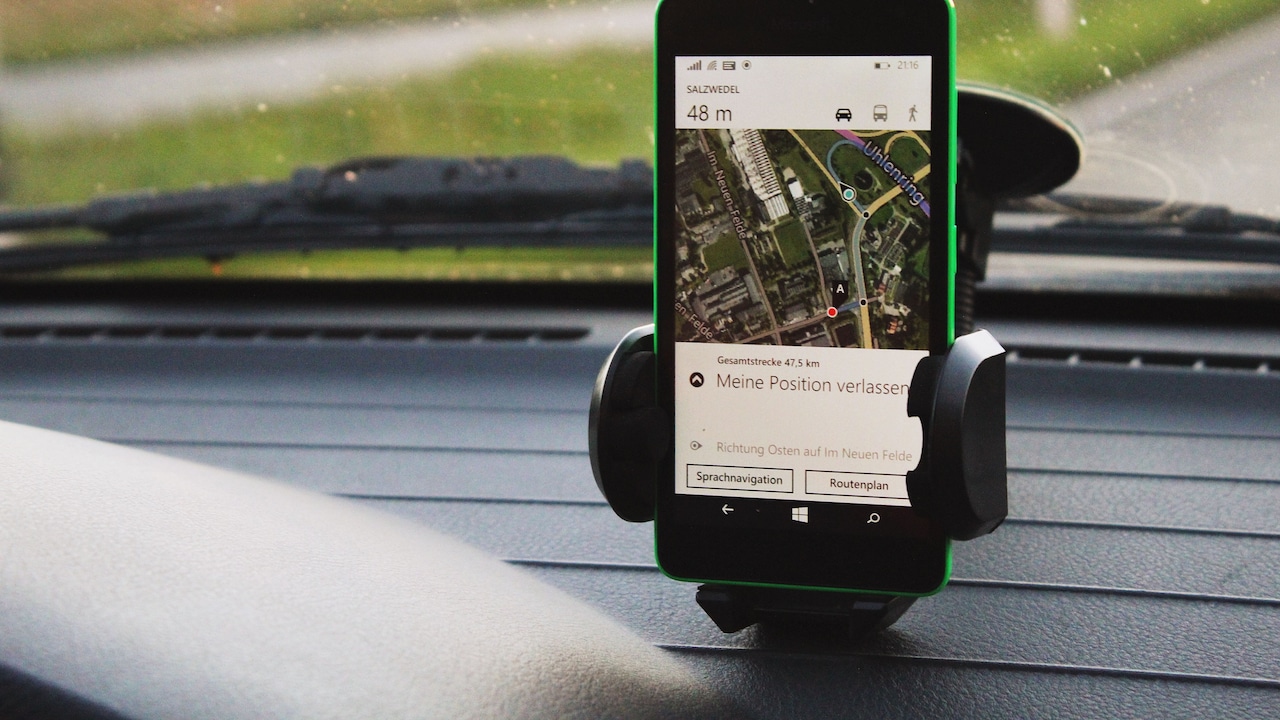
10 Reasons Your Dashboard Phone Holder Will Not Stick And How To Fix It; Photo Credit: Pexels
4. Check Whether You Have Chosen A Curved Mounting Spot
A dashboard doesn't need an obvious slope to cause trouble. Even a gentle curve can prevent a suction cup from contacting the surface evenly.
Place the holder without locking the suction mechanism and look closely around its edges. If one section sits flatter than another, the base may be bridging a curved section of dashboard rather than resting fully against it.
This often happens near instrument clusters, air vents and raised dashboard sections. These locations may provide an excellent viewing angle, which makes them tempting mounting spots. Unfortunately, attractive positioning means little if half the suction cup cannot maintain contact.
Try moving the holder a few centimetres rather than completely changing its location. Sometimes a small shift reveals a much flatter section.
Mounting pads also need flat contact. If an adhesive disc has to bend around the dashboard, tension constantly pulls against the glue underneath.
Think of the mounting base as something that needs complete support, not simply enough room. The flatter and more evenly supported it sits, the less work the adhesive or suction mechanism has to do while the car moves.
5. Check Whether The Phone Is Too Heavy For The Holder
Phone holders don't carry only the weight of the handset. They also carry the case, magnetic accessories, cards and anything else attached to it.
A larger phone in a thick protective case can place considerably more leverage on the holder than a smaller device. Extendable mounting arms make the effect stronger. The farther the phone sits from the dashboard, the more force its weight places on the base.
This explains why a holder can feel perfectly secure when empty yet fall shortly after the phone goes in.
Try shortening any telescopic arm and positioning the phone closer to the mounting point. You may lose a little reach, but you reduce the leverage pulling against the suction cup.
Also consider the case. Nobody needs to remove essential protection simply to please a phone holder, but unusually bulky wallet cases and heavy attachments may push a lightweight mount beyond its comfortable limit.
If the holder repeatedly fails only when carrying the phone, the problem might not be surface adhesion alone. The base may simply be fighting more weight than its design comfortably supports.
6. Reduce The Length And Angle Of Adjustable Arms
Adjustable arms make dashboard holders convenient. Unfortunately, they also turn a compact mounting problem into a miniature lesson in physics.
Imagine holding a heavy shopping bag close to your body. Now hold the same bag with your arm fully extended. The bag hasn't become heavier, yet keeping it there feels much harder. A dashboard mount experiences something similar.
When a telescopic arm stretches forward, the phone creates more leverage against the mounting point. Road vibration amplifies the movement. Every bump makes the phone shake slightly, and that repeated force eventually challenges the suction seal or adhesive pad.
Keep the extension as short as practical. Adjust the mount so the phone remains visible without hanging dramatically forward.
The joint angle matters too. Positioning the phone extremely high or far to one side can create uneven force across the base.
A more compact arrangement may look less elaborate, but it usually puts less strain on the holder. Once the phone sits at a comfortable viewing angle, resist constantly repositioning it. Frequent twisting can gradually loosen joints and disturb the base.
10 Reasons Your Dashboard Phone Holder Will Not Stick And How To Fix It; Photo Credit: Pexels
7. Check Whether Road Vibrations Are Gradually Breaking The Grip
A dashboard holder rarely announces that it has started coming loose. More often, each bump contributes a tiny amount of movement until the mount finally gives up.
Rough patches, speed breakers and uneven road surfaces send vibration through the dashboard. A securely installed holder should tolerate normal movement, but a marginal suction seal may weaken little by little.
Observe the phone while driving over an uneven stretch. Excessive wobbling can indicate that the mounting arm sits too far out, a joint has loosened or the base itself has started moving.
Tighten adjustable joints where the design allows it. Keeping the phone closer to the dashboard can also reduce vibration.
Some mounting positions naturally move more than others. A thin raised section of dashboard may flex slightly, while a broader, supported section stays more stable.
Don't judge stability only while the car is parked. Give the holder a gentle movement test after installation. If the entire base shifts easily when the phone moves, normal driving will probably make matters worse.
A mount should absorb small movements without turning them into repeated pulling at its own attachment point.
8. Inspect The Suction Cup For Warping Or Damage
Suction cups don't necessarily look “broken” when they stop working.
Repeated heat exposure, ageing and being stored in an awkward position can change the shape of the rubber. The edge may curl slightly or develop small imperfections that allow air underneath.
Remove the holder and place the suction cup on a flat surface. Look at it from the side. The rim should appear even rather than distorted.
Cleaning may restore grip if dirt causes the problem. Some reusable gel pads also regain tackiness after gentle cleaning according to their care instructions. They need to dry properly before reuse.
However, material that has hardened, cracked or permanently warped usually won't behave like new again. Trying increasingly creative ways to force a damaged suction cup onto the dashboard may provide temporary success, followed by another dramatic fall during the next drive.
This is one situation where replacement may make more sense than endless adjustment.
Before replacing the entire holder, check whether the manufacturer offers a separate suction base. The arm and cradle may still have plenty of life left even if the mounting surface has deteriorated.
9. Check Whether The Mount Is Being Reattached Too Often
A phone holder may be reusable, but “reusable” doesn't necessarily mean unlimited removal without any change in grip.
People often move mounts between cars, shift them for different drivers or remove them whenever the dashboard needs cleaning. Each removal can expose adhesive surfaces to dust and oils from fingers. Suction cups may also collect particles around their edges.
Frequent repositioning creates another issue: installation becomes rushed. Instead of carefully cleaning the new spot and pressing the mount properly, it gets attached wherever convenient because the journey is about to begin.
Choose a stable position and leave the base there whenever practical. Many holders allow the phone cradle or arm to detach while the mounting plate remains fixed.
If repositioning becomes necessary, treat it as a fresh installation rather than simply moving the holder from one patch of dashboard to another.
Clean the new surface, inspect the base and make sure the location suits the mounting system.
A holder that changes address every few days has far more opportunities to collect contamination and develop a weak seal than one allowed to stay comfortably in the same place.
10. Reconsider The Mounting Location Instead Of Blaming The Holder
Sometimes the phone holder isn't failing. The chosen location simply asks too much from it.
Drivers naturally want the phone where navigation feels easy to glance at. That can encourage mounting it on a steep dashboard slope, directly under sunlight or at the end of a long adjustable arm.
A better position balances visibility with stability and safety. Look for a flatter section that doesn't require the holder to stretch far towards the driver.
The phone shouldn't obstruct the driver's view of the road or important controls. It should also stay away from areas where airbags deploy. A secure mount in an unsafe position still creates a problem.
Spend a few minutes testing locations before sticking anything permanently. Sit normally, place the phone where it would go and check whether the screen remains easy to see without demanding an awkward head movement.
Often, moving the holder a surprisingly small distance improves both stability and usability.
The best mounting point isn't necessarily the closest one. It is the location where the surface, temperature, viewing angle and holder design work together rather than fighting one another.
Products Related To This Article
1. Kratos Grip X4 Dashboard & Windshield Car Mobile Holder with Strong Suction Cup
2. Elfora Vacuum Suction Magnetic Phone Holder
3. Portronics Clamp M4 Prime Magnetic Car Phone Mount with Strong Suction Cup
4. Blackstar Armstrong - Multi-Purpose Magnetic Mobile Holder for Car Dashboard
5. auriglo 360° Rotatable Dashboard Car Phone Holder
6. OQTIQ SUCGLES Easy One Touch Car Phone Holder
7. ESR for MagSafe Car Mount, Magnetic Car Mobile Holder, Black
A dashboard phone holder that keeps falling can feel like a minor annoyance until it drops during navigation or disappears beside the passenger seat at exactly the wrong moment. Before replacing it, examine the conditions around the mount.
Heat, textured dashboard materials, cleaning residue, curved surfaces and extended mounting arms can all weaken an otherwise capable holder. Phone weight and constant vibration add further strain. A little troubleshooting can often reveal that the mount itself isn't the main problem.
Start with the surface, shorten the arm, reduce unnecessary weight and pay attention to when the holder tends to fail. If the suction cup has warped or the adhesive has genuinely worn out, replacement becomes the sensible option. Otherwise, a cleaner, flatter and cooler mounting spot may be all it needs to finally stay put.
(Disclaimer: This article may include references to or features of products and services made available through affiliate marketing campaigns. NDTV Convergence Limited (“NDTV”) strives to maintain editorial independence while participating in such campaigns. NDTV does not assume responsibility for the performance or claims of any featured products or services.)